Wi-Fi does not stand for Wireless Fidelity. That phrase turns up everywhere, including in the earlier version of this page, and it is a story that got attached to the name after the fact. The Wi-Fi Alliance hired a branding agency in 1999 because nobody was going to ask a shop assistant for “IEEE 802.11b Direct Sequence”. The agency came back with Wi-Fi. It rhymed with hi-fi and it meant nothing at all. A marketing tagline briefly paired it with “The Standard for Wireless Fidelity”, which is where the myth comes from, and the Alliance dropped the tagline once it started causing confusion.
So the name is empty. The technology underneath it is not.
What Wi-Fi actually is
Wi-Fi is a set of radio standards published by the IEEE under the number 802.11, plus a certification programme run by the Wi-Fi Alliance that tests whether kit from different manufacturers will talk to each other. The IEEE writes the rules. The Alliance hands out the logo.
Your router contains a radio. So does your laptop, your phone, your doorbell and your television. When your laptop sends a file, its radio turns that data into a modulated signal in a licence-exempt band, the router’s radio picks it up and demodulates it back into data, then pushes that out of the WAN port towards your provider. The wireless part covers the last few metres of the journey and nothing else. Everything beyond the router is copper, fibre or somebody else’s radio.
That distinction matters more than it sounds. A very large share of “my Wi-Fi is slow” problems are not Wi-Fi problems at all. They are line problems, and the wireless network is simply the part you can see.
The bands, and why there are several
Wi-Fi runs in bands that regulators have set aside for unlicensed use. You do not need a licence to transmit in them, which is why they are crowded.
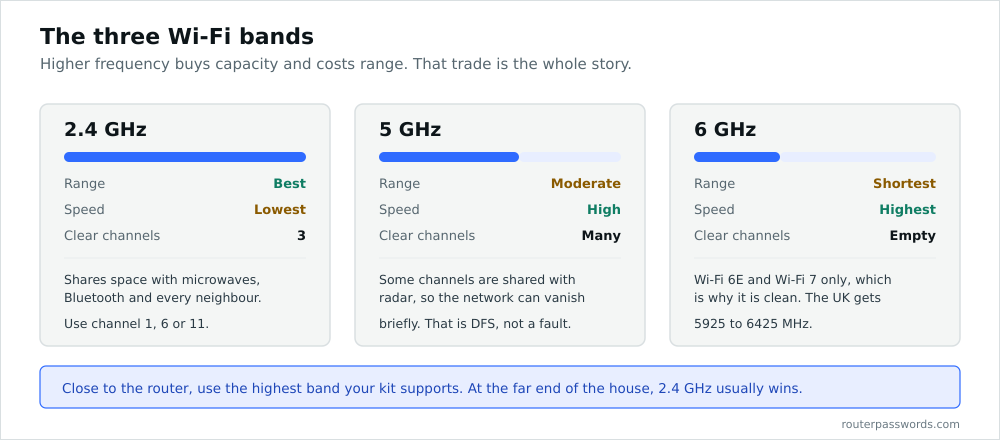
2.4 GHz
The original band, and still the most useful one for range. Long wavelengths pass through plasterboard and brick better than short ones, so 2.4 GHz reaches the end of the garden when 5 GHz has given up. It is also where microwave ovens, Bluetooth, older cordless phones, baby monitors and a great deal of cheap wireless tat all live. In most of the world it offers three channels that do not overlap: 1, 6 and 11. Three. That is the entire budget, shared with every neighbour in range.
5 GHz
Far more channels, far more capacity, considerably less range. Some of those channels are shared with weather and military radar, so access points have to run Dynamic Frequency Selection and vacate a channel if they detect a radar sweep. If your 5 GHz network occasionally disappears for a minute, DFS is often the reason.
6 GHz
Opened to Wi-Fi in 2020 and 2021. In the UK and most of Europe the allocation covers 5925 to 6425 MHz, which is enough room for three 160 MHz channels with nothing legacy in them. In the United States the allocation is roughly twice that. The band is clean because only Wi-Fi 6E and Wi-Fi 7 devices can use it, and that cleanliness is its main attraction. Range is worse again.
The standards, in order
The Alliance started using generation numbers with Wi-Fi 4, partly because “802.11ac is faster than 802.11n but 802.11ad is something else entirely” was not working on a box in Currys.
| Standard | Name | Year | Bands | Maximum link rate |
|---|---|---|---|---|
| 802.11b | 1999 | 2.4 GHz | 11 Mbps | |
| 802.11a | 1999 | 5 GHz | 54 Mbps | |
| 802.11g | 2003 | 2.4 GHz | 54 Mbps | |
| 802.11n | Wi-Fi 4 | 2009 | 2.4 and 5 GHz | 600 Mbps |
| 802.11ac | Wi-Fi 5 | 2013 | 5 GHz | 6.9 Gbps |
| 802.11ax | Wi-Fi 6 | 2019 | 2.4 and 5 GHz | 9.6 Gbps |
| 802.11ax | Wi-Fi 6E | 2021 | adds 6 GHz | 9.6 Gbps |
| 802.11be | Wi-Fi 7 | 2024 | 2.4, 5 and 6 GHz | 46 Gbps |
Treat that last column with suspicion. Those are theoretical link rates assuming the maximum number of spatial streams, the widest channel the standard allows, and a client sitting almost on top of the access point. A Wi-Fi 6 phone in a real house, two rooms away, on an 80 MHz channel, with two streams, will negotiate a fraction of 9.6 Gbps and then deliver perhaps half of that as usable throughput. The number on the box is a ceiling, not a promise.
The earlier version of this page claimed 802.11n tops out at 104 Mbps. It does not. Four spatial streams on a 40 MHz channel gets you to 600 Mbps on paper. The 104 figure appears to have been copied from somewhere and never checked, which is worth mentioning because a great deal of Wi-Fi writing on the internet is copied from somewhere and never checked.
What changed with Wi-Fi 6, and why it is not really about speed
Wi-Fi 5 made a single connection faster. Wi-Fi 6 made a crowded network work properly, which in a modern house matters far more.
The headline mechanism is OFDMA. Earlier Wi-Fi gave each device the whole channel for the duration of its transmission, however small that transmission was. A thermostat reporting a temperature took the same slot as a laptop pulling a file. OFDMA splits the channel into resource units so the access point can serve several small clients in one go. Target Wake Time lets battery devices agree a schedule with the router and sleep between slots, which is why Wi-Fi 6 sensors last longer on a cell. BSS Colouring tags frames so an access point can tell its neighbour’s traffic from its own and stop deferring to it unnecessarily.
None of that shows up in a speed test with one laptop in an empty house. All of it shows up in a flat with forty connected devices.
Wi-Fi 7, briefly
Wi-Fi 7 widens channels to 320 MHz and adds Multi-Link Operation, which lets a client use 5 GHz and 6 GHz at the same time rather than picking one. MLO is the interesting part. Latency becomes more predictable because a device is no longer stranded when its chosen band gets busy.
Modulation also climbs to 4096-QAM. That buys a few per cent in laboratory conditions and almost nothing in a room with furniture in it.
You need a Wi-Fi 7 router and a Wi-Fi 7 client to see any of it, and in the UK the 320 MHz channel has nowhere to fit in our 500 MHz of 6 GHz spectrum. Buy it if you are replacing a router anyway. Do not buy it to fix a slow connection.
Security, since we are here
Every one of these standards carries data that anyone within range can receive. Encryption is what stops them reading it. WPA2 has been the baseline since 2004 and is still adequate for a home network with a long passphrase. WPA3 is better, mainly because its handshake resists the offline dictionary attack that WPA2 permits, and because it encrypts open networks so a coffee shop hotspot stops being a free read of your traffic.
WEP is broken. It has been broken since 2001 and can be cracked in minutes. If a device only supports WEP, that device belongs in a bin, not on your network.
We go through the settings that actually matter in Wi-Fi security basics. If you have arrived here because you cannot get onto your own network, start with how to find your Wi-Fi password, and if you are trying to get into the router itself rather than onto the wireless, those are two different credentials and we explain the difference in Wi-Fi password versus router password.
Common questions
Does Wi-Fi stand for anything?
No. It is a brand name chosen in 1999 because it was short and memorable. The “Wireless Fidelity” expansion came from a marketing tagline and was later dropped.
Is 5 GHz always better than 2.4 GHz?
No. It is faster where the signal is strong and worse where it is weak. Close to the router, use 5 GHz. At the far end of the house, 2.4 GHz will often be quicker despite the lower link rate, because a poor 5 GHz signal spends most of its time retransmitting.
Why is my Wi-Fi slower than the speed I pay for?
Usually because the bottleneck is not the Wi-Fi. Test with a cable first. If the wired result matches your package and the wireless result does not, the problem is wireless. Channel congestion is the usual cause.
Do I need Wi-Fi 6 or Wi-Fi 7?
Only if you have a lot of devices or a connection faster than about 500 Mbps. On a 70 Mbps line with six devices, a working Wi-Fi 5 router will not hold you back.