The previous version of this page told you to turn WPS on. That advice was wrong, it had been wrong for about a decade before we published it, and it is the first thing this rewrite corrects. WPS should be off. We will come to why.
Most home wireless security comes down to five settings, and only about three of them do any real work. The rest is folklore that gets repeated because it sounds sensible.
Get into the router first
Everything below happens inside the router’s settings pages. You reach those with a browser, usually at 192.168.1.1 or 192.168.0.1, occasionally at an address like bthomehub.home or routerlogin.net.
The password you need here is the admin password, which is not your Wi-Fi password. People conflate the two constantly and then wonder why the router rejects a passphrase that works fine on their phone. We have written up the distinction in Wi-Fi password versus router password. If the router has never been reconfigured, the admin credentials are usually printed on a sticker underneath it, and if the sticker has worn off, our directory of default logins covers 460 manufacturers.
1. Use WPA3 if the router offers it, WPA2 if it does not
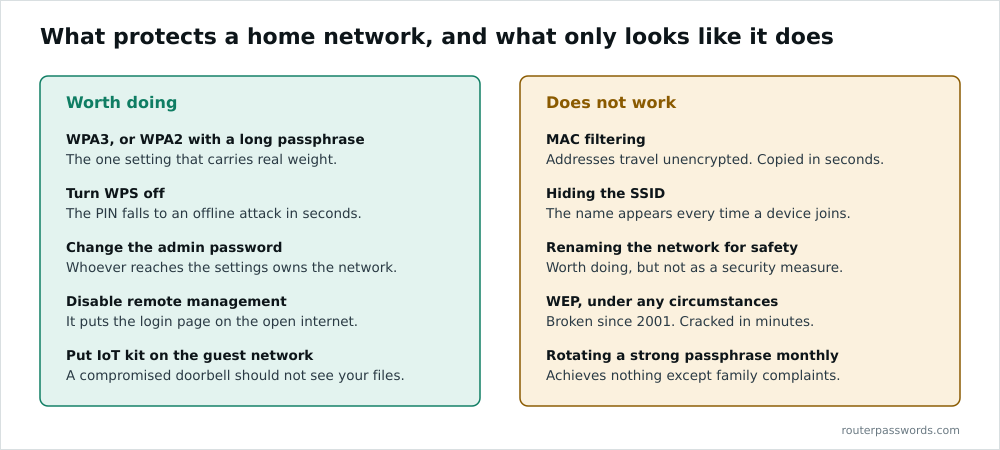
This is the setting that matters. Everything else on this page is a rounding error next to it.
WPA2 has protected home networks since 2004 and is still acceptable. Its weakness is structural: an attacker within range can capture the four-way handshake when a device joins and then grind through password guesses offline, at whatever rate their hardware allows. A 2018 technique called the PMKID attack made this worse by removing the need to wait for a client to connect at all. Neither attack breaks the encryption. Both attack your passphrase.
WPA3 replaces that handshake with SAE, which does not hand an attacker anything they can grind on offline. Each guess has to be made against the live network, which turns an afternoon’s work into something impractical.
Most routers offer a WPA2/WPA3 transition mode. Use it. Old devices keep working on WPA2 while anything modern negotiates WPA3.
WEP is not an option. It was broken in 2001 and can be cracked from a captured sample in minutes. If something on your network only speaks WEP, replace the device.
2. Turn WPS off
Wi-Fi Protected Setup was meant to spare people from typing passphrases. You press a button, or you enter an eight-digit PIN, and the device joins.
The PIN is the problem. The protocol validates it in two halves, so an attacker learns whether the first four digits are right independently of the last four. That collapses the search space from a hundred million combinations to about eleven thousand, which is a few hours of automated guessing. Stefan Viehböck published this in 2011. Three years later Dominique Bongard found that many chipsets generated the handshake nonces so poorly that the PIN could be recovered offline from a single exchange, in seconds rather than hours. That one is called Pixie Dust and it still works on plenty of routers in service today.
Turning the feature off closes both. You will find it under Wireless or Advanced, sometimes on a page of its own called WPS. Disable the PIN method at minimum. Disable the whole thing if the router lets you.
The push-button method is considerably safer than the PIN, because the window is roughly two minutes rather than permanent. It is still an unauthenticated join sitting on the outside of your router, and on many models disabling the PIN is not offered separately.
3. Change the router’s admin password
Anyone who reaches the admin pages owns the network. They can read the wireless passphrase in plain text, change your DNS servers to something they control, or lock you out until you find a paperclip.
On an ISP-supplied router the default admin password is printed on the case, which is fine as a shipping arrangement and poor as a permanent one. Anyone who has been in your house has had the opportunity to photograph it. Change it to something that is not the Wi-Fi passphrase.
While you are in there, find the setting your vendor calls Remote Management or WAN Admin. Make sure it is off. That setting exposes the login page to the entire internet. Automated scanners find those within hours of a router coming online, and a device answering on the WAN side with factory credentials will not last the day.
4. Pick a passphrase that survives offline guessing
Since the realistic attack on WPA2 is offline brute force, passphrase length is what buys you time. Complexity rules help less than people think, because the guessing software knows about substituting 3 for e.
Four or five unrelated words beat a mangled dictionary word of the same length, and they are far easier to read out to a visitor. Twenty characters is a reasonable floor on a home network. Avoid anything guessable from your address, your surname or the SSID.
If you have forgotten what you set, it is recoverable from any device already connected without a reset, and we walk through that for every platform in how to find your Wi-Fi password.
5. Use the guest network for anything you do not control
This is the one genuinely useful feature most people ignore. A guest network hands out internet access while keeping those devices off the subnet where your laptop and your file server live.
Put visitors on it. Put smart plugs, cameras, televisions and anything else with a cloud app on it too. Consumer IoT firmware is frequently poor and rarely updated, and the point of isolation is that a compromised doorbell should not be able to see your file server. Check that “allow guests to see each other” and any LAN access option are both disabled, because some routers ship with them on.
What does not work
MAC filtering
Every frame your devices transmit carries their MAC address in clear text, whether the network is encrypted or not. An attacker listens for a minute, notes an address that the router accepts, and sets their own interface to match. This is a two-command operation.
Modern phones also randomise their MAC per network by default, so the practical effect of enabling MAC filtering is that your family’s devices stop connecting after an OS update while an attacker is unaffected. We left this on the old version of this page as a security measure. It is not one.
Hiding the SSID
A hidden network still transmits. Its name appears in the association frames every time a device joins, and any of the standard tools display it within seconds. Meanwhile your own devices now broadcast the name of your network constantly as they probe for it, which arguably makes things worse when you carry a laptop around town.
Changing the SSID for security
Worth doing, but not for security. Change it because “BTHub6-K3XQ” tells anyone nearby which router model you have, and because it is easier to find your own network in a list of twenty. It does not stop anybody.
Keep the firmware current
Router vulnerabilities are patched in firmware, and a router that has not been updated in four years is running four years of known bugs. ISP-supplied kit usually updates itself. Retail routers often do not, and the setting that enables automatic updates is frequently buried and frequently off by default.
Check the manufacturer’s support page for your exact model number, not the family name. If the model has reached end of support, that is a reason to replace it, and a five-year-old router is generally past the point where a new one is a better use of money than another evening of tuning.
Common questions
Should I turn WPS on or off?
Off. The PIN method has two published attacks against it, one of which recovers the PIN in seconds on a large number of consumer routers.
Is WPA2 still safe in 2026?
For a home network with a long passphrase, yes. WPA3 is better and you should use it where both the router and the devices support it, but WPA2 with a twenty-character passphrase is not the weak point in most houses.
Does MAC filtering stop anyone?
No. MAC addresses travel unencrypted in every frame and can be copied in seconds.
Do I need to change my Wi-Fi password regularly?
No. Change it if you think it has leaked, or if a device that knew it has left the house for good. Rotating a strong passphrase on a schedule achieves nothing except family complaints.