Your router has four LAN ports. You have a television, a games console, a desktop, a printer, a NAS and an access point you would like to put upstairs. That is the entire problem, and a switch is the twenty pound answer to it.
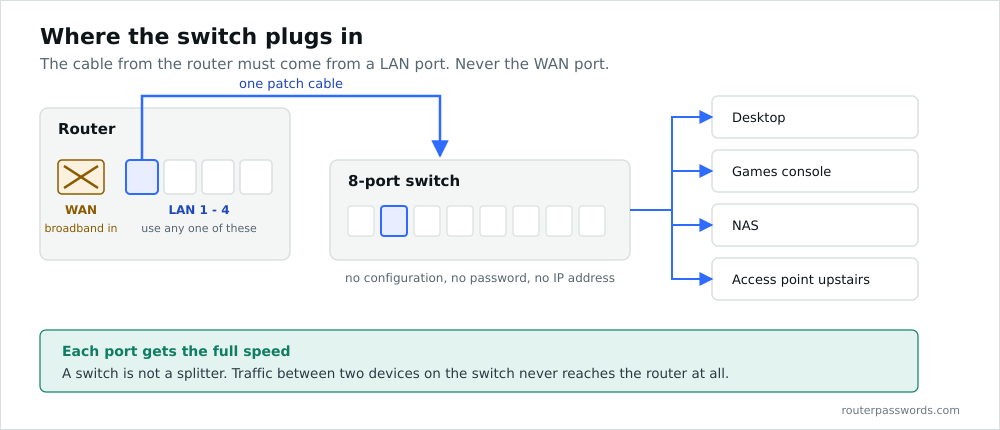
One correction before anything else, because the earlier version of this page got it wrong. Do not plug the switch into the router’s WAN port. The WAN port is where your broadband comes in. Put the switch there and either nothing works or, on some routers, the switch ends up on the wrong side of the firewall. Use a LAN port.
What a switch actually does
A switch takes one connection and turns it into many, but it is not a splitter. Each port gets the full link speed. Plug eight devices into a gigabit switch and each of them has a gigabit to the switch, and they can talk to each other at that speed without the traffic ever reaching the router.
That last part is the bit people miss. Copying a file from your desktop to a NAS on the same switch never troubles your router or your broadband line. The switch handles it locally at wire speed.
What a switch does not do is hand out IP addresses, run a firewall or connect you to the internet. Your router keeps doing all of that. The switch only widens the road.
Wiring it up
- Take a patch cable from any LAN port on the router. Not the WAN port, which is usually a different colour and sits slightly apart from the others.
- Plug the other end into any port on the switch. Modern switches auto-sense, so there is no dedicated uplink port to find and no crossover cable to buy. If your switch is old enough to have a port marked Uplink next to a button, use that port and leave the button alone.
- Connect your devices to the remaining ports.
- Power the switch on and wait about thirty seconds for the link lights to settle.
Nothing needs configuring. An unmanaged switch has no settings and no web interface to log into. It learns which device is on which port by watching traffic, and it does that within a second or two of being switched on.
If a device does not get an address, the fault is almost never the switch. Check that the cable from the router is in a LAN port, then check the link light at both ends of that cable.
Unmanaged, smart or managed
The three tiers look similar in a photograph and differ enormously in price.
Unmanaged switches are sealed units. No IP address, no login, nothing to break. For a house, or for adding ports to an office network that already works, this is almost always the right purchase. Five ports for around fifteen pounds, eight for a little more.
Smart or web-managed switches add a web interface and the features most small networks actually want: VLANs, port-based QoS, link aggregation and a usable set of statistics. Worth the extra thirty or forty pounds if you intend to separate CCTV or guest traffic onto its own VLAN.
Fully managed switches add a command line, routing, spanning tree tuning and everything else an enterprise needs. If you are reading this page, you do not need one.
Speed, and where it actually matters
Gigabit is the sensible baseline and has been for years. Buying a 100 Mbps switch in 2026 to save four pounds is a false economy, particularly since a great many UK lines now exceed 100 Mbps and the switch would become the bottleneck for the whole house.
Above gigabit the calculation changes. A 2.5 Gbps switch is worth it if you have a multi-gigabit broadband line or you move large files between machines that both have 2.5 Gbps ports. A 10 Gbps switch is worth it in an editing suite and nowhere else in a home, and it will run hot and cost more than the rest of your network combined.
Cat5e carries gigabit perfectly well over any distance you will find in a house, so there is rarely a reason to rewire. Cat6 or Cat6a is worth specifying for new runs if you might want 2.5 or 10 Gbps later.
Power over Ethernet
A PoE switch puts power down the same cable as the data, which is how wireless access points and IP cameras get installed in places with no socket. It is the single most useful upgrade over a plain switch if you have any of that kit.
Two numbers matter. The per-port standard sets what a single device can draw: 802.3af gives about 15 watts, 802.3at about 30, and 802.3bt reaches 60 or 100 for things like PTZ cameras with heaters. The total budget is separate and lower than people expect. An eight-port switch advertising 802.3at may have a 65 watt budget across all eight, which is two heated cameras and not much else.
Check the budget figure on the datasheet before buying, not the per-port figure on the box.
Adding more switches
Switches chain happily. Run a cable from a port on the first to a port on the second and carry on. Each hop adds a few microseconds of latency, which is meaningless at home.
The one thing to avoid is a loop. Two cables between the same pair of unmanaged switches, or a patch cable accidentally plugged back into the same switch, will circulate broadcast frames until the network stops responding entirely. Unmanaged switches have no spanning tree protocol and no defence against this. The symptom is the whole network dying at once with every link light flashing in unison, and the fix is unplugging cables until it stops.
Keep exactly one router handing out DHCP as well. Adding a second router as a switch is possible, but you have to disable its DHCP server first and connect it LAN to LAN, leaving its WAN port empty.
Where to put it
Somewhere ventilated, and somewhere you can reach. Switches are quiet and cool if they are unmanaged and fanless, and cupboards under stairs are fine. PoE switches under load get genuinely warm and should not be buried under coats.
If you are running cables to more than about four rooms, a patch panel in a small wall cabinet with the switch beneath it will save you an enormous amount of irritation later. Label both ends of every cable while you can still remember where they go.
Common questions
Does a switch slow down my internet?
No. A gigabit switch on a broadband line of any normal UK speed adds no measurable delay and no loss of throughput.
Which router port does the switch go into?
Any LAN port. Never the WAN or Internet port.
Do I need to configure an unmanaged switch?
No. It has no configuration to do. Plug it in and it works.
Can I use a switch instead of a router?
No. A switch has no firewall and does not hand out addresses. You need the router as well.
What is the difference between a switch and a hub?
A hub repeats every frame to every port and shares the bandwidth between them. A switch sends each frame only to the port where its destination lives. Hubs have not been sold for two decades for good reason.
Why is my new switch not getting an IP address?
Unmanaged switches do not have one. That is normal. Only smart and managed switches appear on the network as devices.