Most speed tests are run over Wi-Fi, on a phone, in the room furthest from the router, while somebody upstairs is streaming. Then the number gets quoted to the provider, who runs their own test, gets a different answer and closes the ticket on that basis.
Getting a figure worth arguing with takes about ten minutes of preparation. The test itself takes thirty seconds.
Set it up so the result means something
- Use a cable. Plug a laptop into a LAN port on the router. Turn its Wi-Fi off at the operating system, not just disconnect it, because some machines will happily route around a disconnected adapter.
- Clear the line. Pause cloud backups and close anything that streams. A games console downloading an update in standby will quietly consume the whole line, and it does not need to be switched on to do it.
- Use one machine. Everything else should be idle or switched off. You are measuring the line, not the household.
- Test more than once. Three runs, a few minutes apart. One reading tells you very little.
- Record the time. A result at nine in the morning and a result at eight in the evening tell two different stories, and the gap between them is often the whole complaint.
If the laptop has only USB-C, a cheap gigabit adapter is worth owning. A 100 Mbps adapter will cap the result at around 94 Mbps and send you chasing a fault that does not exist.
Which test to use
Ookla Speedtest
The default, at speedtest.net. Enormous server network, so you can usually find one close by, and the apps for Windows, macOS, iOS and Android avoid browser overhead entirely. Its weakness is that it picks a nearby, well-connected server, which flatters the result compared with real traffic crossing the internet.
Cloudflare
At speed.cloudflare.com. The most useful of the browser tests, because it reports jitter and loaded latency alongside throughput. If your connection is fine on paper but calls break up, this is the one that shows you why.
Fast.com
Netflix’s test. It measures against the Netflix delivery network rather than a general server, which makes it the honest answer to “will streaming work” and a poor answer to anything else. Click the details link to get upload and latency, which it hides by default.
ThinkBroadband
Worth knowing if you are in the UK. Long-established, and its results are widely accepted in provider disputes. It also keeps a history if you register, which matters when you are building a case about a line that degrades in the evening.
Your provider’s own test
Run it too, even though it is the most generous. When you open a ticket they will quote it back at you, and it is better to know what it says beforehand.
Reading the numbers
Download and upload
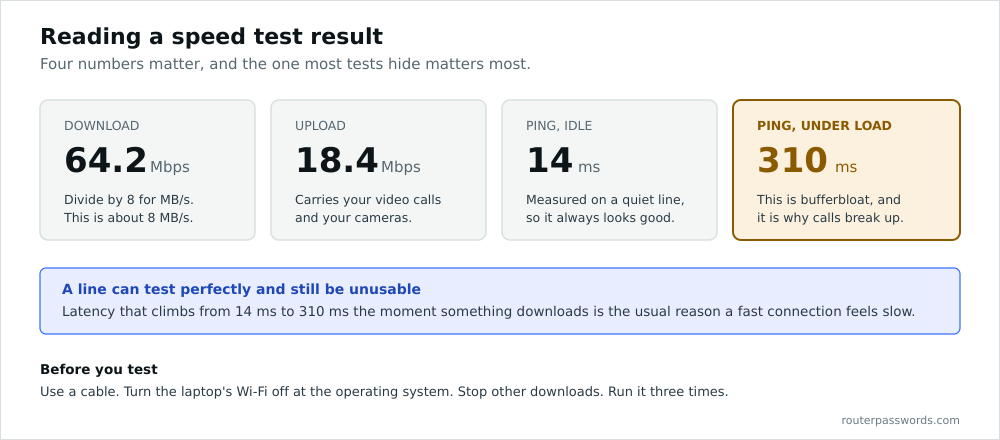
Both are in megabits per second. Your browser’s download indicator is usually in megabytes per second, which is eight times smaller. A 40 Mbps line downloads at about 5 MB/s at best, and people regularly report this as a fault.
Upload used to be an afterthought. It is not now. Video calls, cloud backup, security cameras and anything you host all lean on upload, and a connection with 500 Mbps down and 20 up will feel broken during a call while testing perfectly.
Latency
Round-trip time in milliseconds. Under 20 ms is good on fibre and 20 to 40 ms is normal on FTTC. Past about 100 ms, gaming turns unpleasant and conversation goes stilted. Satellite sits far higher than that by physics rather than by fault.
Jitter
The variation in that latency. A steady 40 ms is comfortable. A connection bouncing between 20 ms and 300 ms is not, and it is the usual reason a call sounds robotic on a line that tests fast.
Loaded latency and bufferbloat
The one worth understanding, and the one most tests ignore. Idle latency is measured on a quiet line. Loaded latency is measured while the connection is saturated, which is when it matters.
Poorly configured equipment buffers aggressively, so latency climbs from 20 ms to several hundred as soon as anything downloads. That is bufferbloat, and it is why the whole house goes sluggish the moment somebody starts a large upload. Cloudflare’s test reports it. Smart Queue Management on a decent router fixes it.
Why the result is lower than the package
Advertised speeds are averages. UK providers quote a figure that at least half of customers get at peak time. Yours may legitimately sit below it.
Protocol overhead is real. Expect to lose a few per cent to headers before anything else. On DSL the loss is larger.
The sync rate is the ceiling. On DSL and FTTC the router negotiates a rate with the exchange or cabinet, and that number caps everything. Find it in the router’s status page. If you cannot get in, the admin password is on the sticker, or in our directory of default logins when the sticker has gone.
Wi-Fi is not the line. If a wired test hits the package and a wireless test does not, the line is fine and the wireless needs work. We go through that in how to speed up your internet.
The far end has limits too. A download that crawls from one site and flies from another is telling you about that site, not your connection.
Building a case
If the line is genuinely underperforming, evidence is what moves it forward.
Take wired results at several times across several days, and keep the timestamps. Note the sync rate and the SNR margin from the router alongside them. Screenshot everything.
UK providers signed up to Ofcom’s broadband code have to give you a minimum guaranteed speed at the point of sale and a window to fix it if you fall below, with the right to exit the contract without penalty if they cannot. That is a much stronger position than a disputed phone call, and it rests entirely on having numbers from a wired connection rather than a phone in the kitchen.
Common questions
Why is my speed test slower on Wi-Fi?
Because the wireless link is a separate bottleneck. Distance, walls, channel congestion and the age of the device all cut into it before the broadband line is reached.
How many times should I test?
At least three runs in a session, and sessions at different times of day. A single result at midnight proves nothing about the evening.
What is a good ping?
Under 20 ms on fibre and under 40 ms on FTTC. For gaming the consistency matters more than the number, so watch the jitter.
Does the speed test server location matter?
Yes. A server in the same city gives a higher number than one three countries away. For comparing like with like, keep using the same server.
My upload is a tenth of my download. Is that broken?
Not on FTTC or cable, where asymmetric profiles are normal. Full fibre is often symmetric or close to it. Check what your package actually promises before raising it.